· 7 min read
Meta Won't Give You Ad Spend by Country and Device. Here Is How to Get It Anyway
Meta's API refuses the country × device breakdown, and a formula gives the wrong answer. Here is the real problem, the wrong shortcut, and the fix we built from ad set targeting.
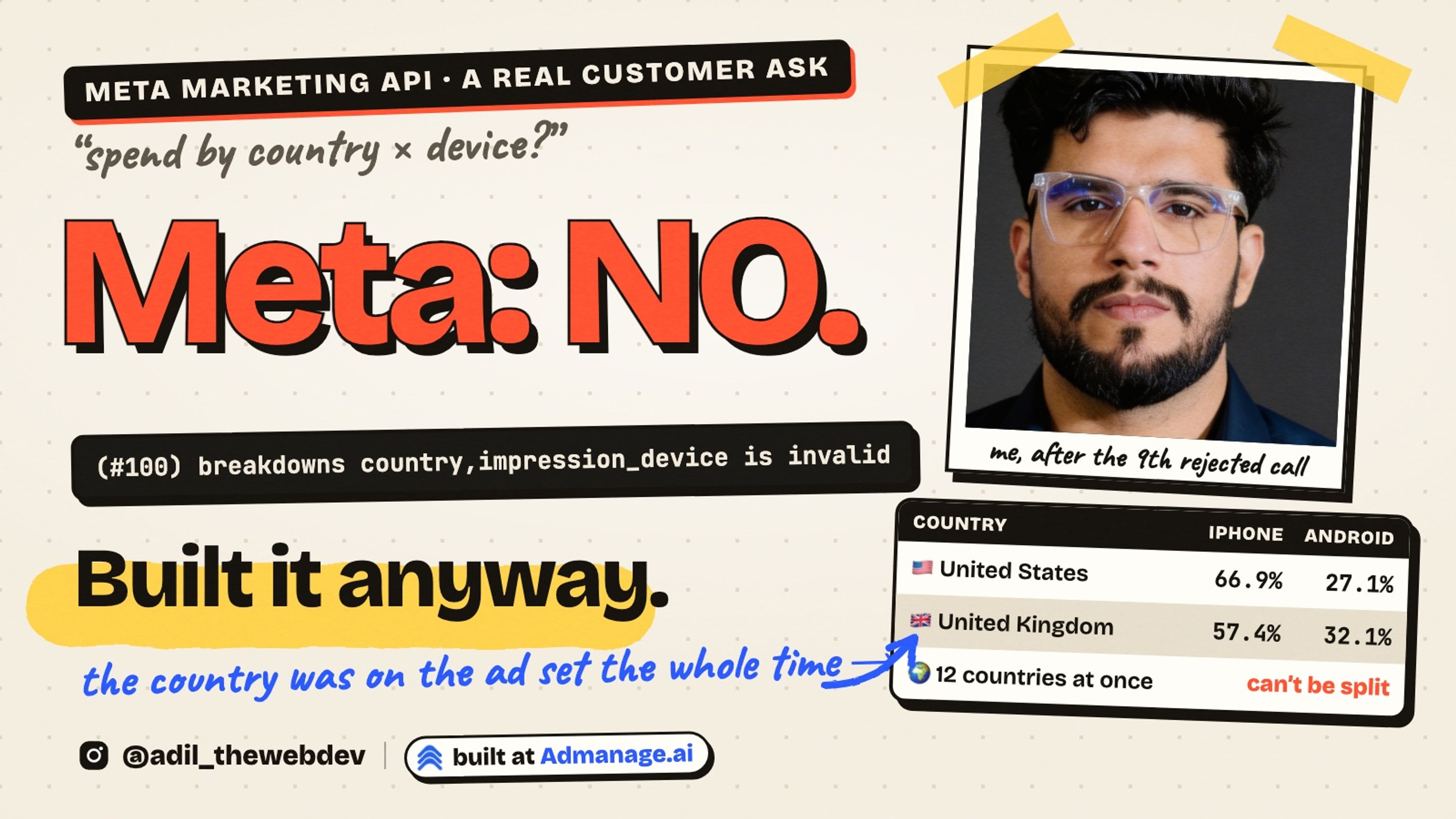
Can you tell how much of your Meta ad spend went to Android phones in the United States?
You would think so. Ads Manager shows spend by country. It also shows spend by device. But try to see both together, and it says the two breakdowns cannot be combined.
A customer asked us for exactly this number. His ad sets run in many countries at once. He wanted to know, for each country, how much went to iPhone and how much to Android. He added one line in the chat: "I'll be impressed if you can pull this one off."
In this post I will show you why Meta refuses, why the obvious shortcut gives a wrong answer, and the solution we built. The main idea fits in 40 lines of TypeScript.
First, what Meta gives you
The Marketing API has an insights endpoint. You ask for spend and you add a breakdown. One breakdown at a time works fine.
GET /v24.0/act_<id>/insights?fields=spend&breakdowns=country
GET /v24.0/act_<id>/insights?fields=spend&breakdowns=impression_device
Now ask for both in one call.
GET /v24.0/act_<id>/insights?fields=spend&breakdowns=country,impression_device{
"error": {
"message": "(#100) Current combination of data breakdown columns (action_type, country, impression_device) is invalid",
"type": "OAuthException",
"code": 100
}
}Maybe a filter works instead of a breakdown? Ask for spend by device, but only for the United States.
GET /v24.0/act_<id>/insights?fields=spend&breakdowns=impression_device
&filtering=[{"field":"country","operator":"IN","value":["US"]}]{
"error": {
"message": "(#100) Filtering on country is not compatible with breakdowns",
"type": "OAuthException",
"code": 100
}
}I tried every pair I could think of. Country and device. Region and device. Country and platform. All rejected with the same error 100. Ads Manager uses the same backend, so it has the same wall.
So Meta knows the answer. It will not say it in one query.
Problem 1: Two totals cannot become one grid
Let's understand why a warehouse does not help here. Many teams sync their Meta data to BigQuery and think the join will fix it. It will not.
Say you have two countries and two devices. Meta tells you: United States 100, United Kingdom 100. And it tells you: iPhone 160, Android 140.
How much did the United States spend on iPhone? It could be 60. It could be 100. It could be anything from 60 to 100. The two totals agree with all of these answers.
A sync only stores the same two totals. There is no row that carries both the country and the device. So there is nothing to join.
Problem 2: The shortcut that looks right
The next idea everyone has is a formula. Take the country share and multiply it by the device share.
/** The shortcut that looks right and is wrong: country share × device share. */
export function estimateCountryDevice(
  spendByCountry: Record<string, number>,
  spendByDevice: Record<string, number>,
): Record<string, Record<string, number>> {
  const total = Object.values(spendByCountry).reduce((sum, spend) => sum + spend, 0);
  const out: Record<string, Record<string, number>> = {};
  for (const [country, countrySpend] of Object.entries(spendByCountry)) {
    out[country] = {};
    for (const [device, deviceSpend] of Object.entries(spendByDevice)) {
      out[country][device] = total > 0 ? (countrySpend * deviceSpend) / total : 0;
    }
  }
  return out;
}
With the numbers above, this says the United States spent 53 on iPhone, and the United Kingdom also spent 53 on iPhone. Same number for both countries.
Why? Because the formula assumes the device mix is the same in every country. That is exactly what is not true. In India most people are on Android. In the United States most people are on iPhone. The customer wanted to measure this difference, and the formula erases it.
So we did not ship an estimate. A wrong number with two decimals is worse than no number.
The solution: the country is on the ad set
Here is the thing we had missed. Meta will not tell you where the spend went. But every ad set already says where it is allowed to go.
An ad set has targeting. The targeting has geo_locations. If an ad set targets only the United States, every dollar it spent was spent in the United States. And Meta is happy to give you that ad set's spend per device.
So the plan is small.
- Read spend per device per ad set, not per account.
- Read each ad set's targeting.
- Turn the targeting into one country, when it is one country.
- Join the two in your own code.
1. Spend per device, per ad set
Same insights endpoint. Two changes: level=adset, and ask for the ad set id.
GET /v24.0/act_<id>/insights
    ?level=adset
    &fields=adset_id,adset_name,spend
    &breakdowns=impression_device
    &time_range[since]=2026-09-16&time_range[until]=2026-10-15
You get one row per ad set and device. Campaign totals and account totals are just the sum of these rows, so nothing else on your page changes.
2. The targeting of every ad set that spent
Collect the distinct ad set ids from those rows. Only ad sets with spend in the range, nothing else on the account. Then read their targeting. Graph accepts up to 50 ids in one call.
GET /v24.0/?ids=<up to 50 ad set ids>&fields=id,targeting/** Graph accepts up to 50 ids per `?ids=` read, so look targeting up in batches. */
export function batches<T>(items: readonly T[], size = 50): T[][] {
const out: T[][] = [];
for (let i = 0; i < items.length; i += size) out.push(items.slice(i, i + size));
return out;
}The answer is one object per id. Here are two real shapes, with the ids changed.
{
  "120223248851160456": {
    "targeting": {
      "geo_locations": {
        "countries": [
          "GB",
          "PH"
        ]
      }
    }
  },
  "120255819695980456": {
    "targeting": {
      "geo_locations": {
        "regions": [
          {
            "key": "3847",
            "name": "California",
            "country": "US"
          }
        ]
      }
    }
  }
}
3. One ad set, one country (when it is one)
This is the heart of it. We read geo_locations and collect every country code it names.
export type CountryTargeting =
  | { kind: "single"; countryCode: string }
  | { kind: "multiple"; countryCodes: string[] }
  | { kind: "unknown" };

// Location types whose entries carry a `country` field.
const HAS_COUNTRY = ["regions", "cities", "zips", "places", "custom_locations"];
// Location types that only exist in the United States.
const US_ONLY = ["geo_markets", "electoral_districts"];
// Location types that cover many countries without naming them.
const UNNAMED = ["country_groups", "location_cluster_ids"];

export function classifyCountry(targeting: unknown): CountryTargeting {
  const geo = isRecord(targeting) && isRecord(targeting.geo_locations) ? targeting.geo_locations : null;
  if (!geo) return { kind: "unknown" };

  const codes = new Set<string>();
  for (const raw of Array.isArray(geo.countries) ? geo.countries : []) {
    const code = countryCode(raw);
    if (code) codes.add(code);
  }
  for (const key of HAS_COUNTRY) {
    for (const entry of Array.isArray(geo[key]) ? geo[key] : []) {
      const code = isRecord(entry) ? countryCode(entry.country) : null;
      if (code) codes.add(code);
    }
  }
  for (const key of US_ONLY) {
    if (Array.isArray(geo[key]) && geo[key].length > 0) codes.add("US");
  }
  for (const key of UNNAMED) {
    if (Array.isArray(geo[key]) && geo[key].length > 0) return { kind: "unknown" };
  }

  if (codes.size === 0) return { kind: "unknown" };
  if (codes.size === 1) return { kind: "single", countryCode: [...codes][0] };
  return { kind: "multiple", countryCodes: [...codes].sort() };
}
A few rules made this correct on real accounts.
- Regions, cities, zips and places carry a
countryfield. An ad set that targets California is a United States ad set. - DMAs and electoral districts only exist in the United States. They add
US. - "Worldwide" and location clusters do not name countries. An ad set that uses them is unknown, even if it also lists a country.
- Excluded locations do not count. Germany minus Austria is still a Germany ad set.
The result is one of three states. One country: exact. Many countries: real spend, but we cannot say which country. Unknown: we could not read it.
4. Join them in your own code
Now fold the insight rows into one record per ad set, and attach the country.
export interface AdSetDeviceRow {
  adsetId: string;
  device: string;
  spend: number;
}

export interface AdSetSpend {
  adsetId: string;
  country: CountryTargeting;
  spend: number;
  byDevice: Record<string, number>;
}

/** Folds insight rows (one per ad set × device) into one record per ad set. */
export function groupByAdSet(
  rows: readonly AdSetDeviceRow[],
  countryOf: (adsetId: string) => CountryTargeting,
): AdSetSpend[] {
  const byId = new Map<string, AdSetSpend>();
  for (const row of rows) {
    const adset = byId.get(row.adsetId) ?? { adsetId: row.adsetId, country: countryOf(row.adsetId), spend: 0, byDevice: {} };
    adset.spend += row.spend;
    adset.byDevice[row.device] = (adset.byDevice[row.device] ?? 0) + row.spend;
    byId.set(row.adsetId, adset);
  }
  return [...byId.values()];
}
And build the table the customer asked for. Country rows, device columns, and the share of the total in every cell.
export interface CountryDeviceCell {
  spend: number;
  shareOfTotal: number;
}

export interface CountryDeviceRow {
  label: string;
  exact: boolean;
  spend: number;
  cells: Record<string, CountryDeviceCell>;
}

/** Country rows × device columns. Single-country ad sets are exact; the rest go in one bucket. */
export function countryDeviceMatrix(adsets: readonly AdSetSpend[]): CountryDeviceRow[] {
  const total = adsets.reduce((sum, adset) => sum + adset.spend, 0);
  const rows = new Map<string, CountryDeviceRow>();
  for (const adset of adsets) {
    const label = adset.country.kind === "single" ? adset.country.countryCode : "Multiple countries (cannot be split)";
    const row = rows.get(label) ?? { label, exact: adset.country.kind === "single", spend: 0, cells: {} };
    row.spend += adset.spend;
    for (const [device, spend] of Object.entries(adset.byDevice)) {
      const cell = row.cells[device] ?? { spend: 0, shareOfTotal: 0 };
      cell.spend += spend;
      cell.shareOfTotal = total > 0 ? (cell.spend / total) * 100 : 0;
      row.cells[device] = cell;
    }
    rows.set(label, row);
  }
  return [...rows.values()].sort((a, b) => Number(b.exact) - Number(a.exact) || b.spend - a.spend);
}
Single-country ad sets become exact rows. Everything else goes into one row that says what it is: spend that Meta cannot split by country.
Problem 3: The ad sets that target 12 countries
Now the honest part. On the customer's account, many ad sets target 12 to 14 European countries at once. For those, our table shows one row: "Multiple countries, cannot be split by Meta", with the list of countries.
Is that a failure? No. It is the truth, and the table says it instead of guessing. His United States and India ad sets each target one country, so for those the numbers are exact today.
And there is a clear way to make the rest exact too: run one ad set per country. The report then fills itself. That is a structure decision for the advertiser, not something an API trick can replace.
Problem 4: Too many calls, and calls that fail
One page load now makes the insights call plus one targeting call per 50 ad sets. For an account with 500 active ad sets that is 10 extra calls, twice, because the page also loads the previous period.
Targeting rarely changes. So we cache the classification per account for a day. Only ad sets missing from the cache go to Meta.
What if the targeting call fails? The page still loads. Those ad sets show under "Country unknown", the table shows the reason, and there is a Retry button. We do not cache the failure, so the next load tries again. A failed lookup must never look like an empty report.
What this does not solve
- Multi-country ad sets stay one row. Only Meta has the per-impression country, and it does not expose it next to the device.
- Targeting is read now, spend is from the past. If someone changed an ad set's countries last week, last month's spend is labelled with this week's targeting. For most accounts this is rare. Say it in the UI anyway.
- "Worldwide" is unknown. A country group names no country, so those ad sets cannot be placed.
All the problems and solutions
- Meta refuses country + device in one query. Read spend per device at ad set level instead.
- Two totals cannot become one grid. Do not try to join them in a warehouse. Join on the ad set.
- The country × device formula is wrong. Do not ship an estimate. Use the ad set's targeting.
- Some ad sets target many countries. Show them as one honest row. One ad set per country makes them exact.
- Extra API calls and failed lookups. Cache per account for a day, never cache a failure, show the error with Retry.
The lesson
When an API says no to a query, do not fake the number. Ask where else the same fact lives. Here the country was on the ad set the whole time.
I post every topic as a short video first. You can follow @adil_thewebdev on Instagram for the next one. And if you are fighting a platform API that refuses to give you the number you need, you can contact me here.