· 15 min read
How to Keep Your API Fast When the Work Is Slow
Stop awaiting everything. The 5 problems we faced with background jobs at work, the fix for each one with a tested queue and worker in TypeScript, and the step to event-driven architecture.
Stop writing signup code like this:
async function signup(req: Req, res: Res) {
  const user = await saveUser(req.body);
  await sendWelcomeEmail(user);
  await notifyAdmin(user);
  res.json({ok: true});
}
It looks correct. Save the user, send the welcome email, tell the admin, answer. What can go wrong?
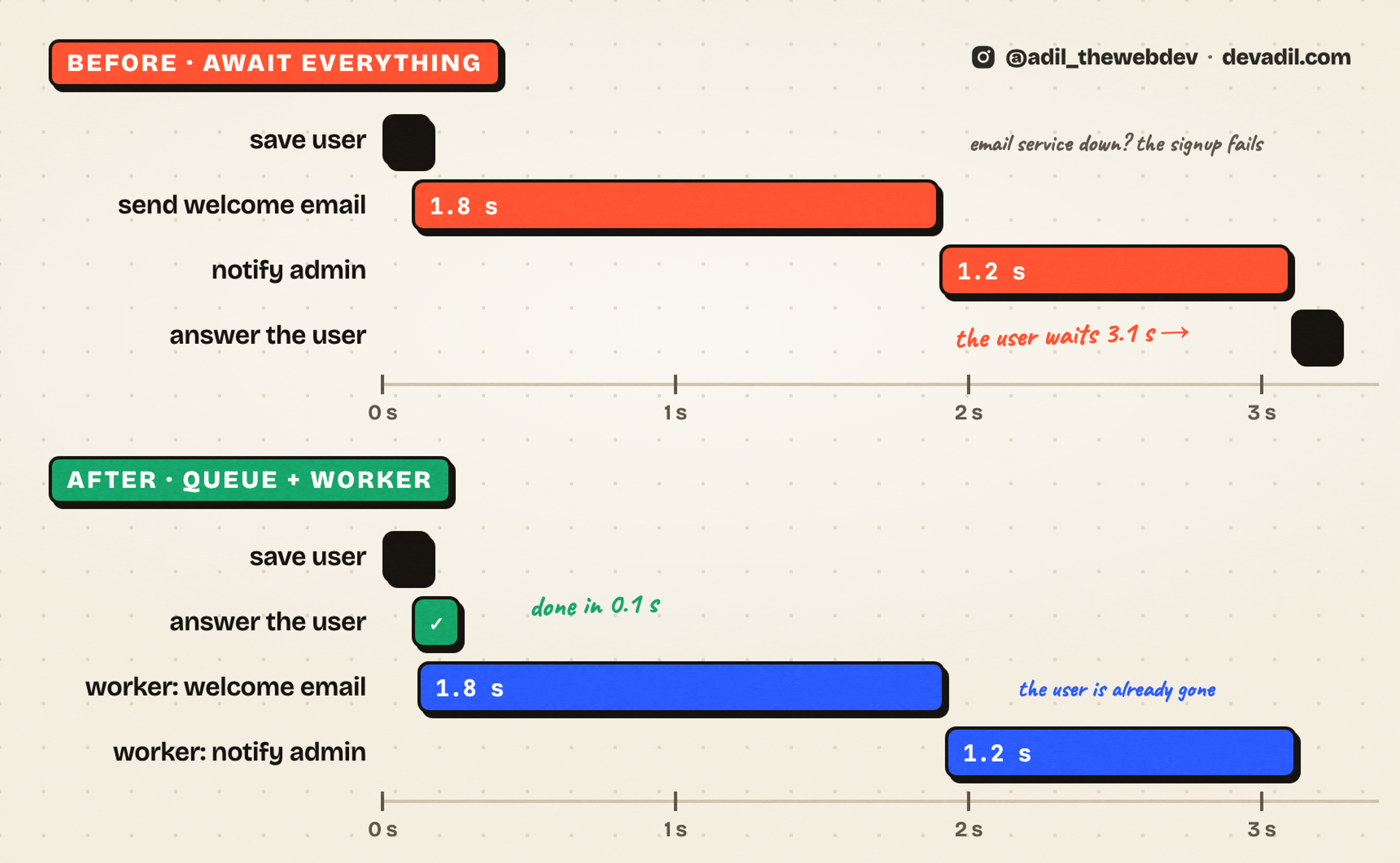
Two things, and both hurt the user. The user waits for all three steps, so one click shows "Loading" for 3 seconds. And if the email service is down, the signup fails. The user did nothing wrong.
In this post I will show you the 5 problems we faced with background work at my job. For each one, I show the solution we made. The main solution is a queue and a worker, in 47 lines of TypeScript. At the end, I show the step from a queue to event-driven architecture, the pattern that big systems are built on.
Words used in this post
If you are new to this, read these first. Every one of them comes back below.
- Job. One piece of work to do later, with a name and some data. "Send the welcome email to user 42" is a job.
- Queue. A list of jobs waiting to be done. The API puts jobs in. A worker takes them out. First in, first out.
- Worker. A separate process that takes jobs from the queue and runs them, one after another. It can be on another server.
- Handler. The function that does one kind of job. The worker finds the handler by the job's name.
- Event. A message that says what happened: "a user signed up". It does not say what to do about it.
- Event-driven architecture. A system where one part announces events, and other parts react to them. AWS has a plain explanation.
- Lock and heartbeat. A worker owns a job for a short time (the lock) and keeps saying "I am still here" (the heartbeat). When the heartbeat stops, the lock runs out.
- Idempotent. Safe to run twice with the same result. Setting a status to "done" twice is idempotent. Sending an email twice is not. Wikipedia.
- Backoff. Waiting longer after every failed try: 200 ms, 400, 800. I wrote a whole post about it.
- Redis. A fast in-memory store. Most Node queues keep their jobs in it. Redis docs.
- BullMQ. The most used queue library for Node, built on Redis. BullMQ docs.
First, what is a queue?
When you order on Amazon, the page says "Order placed" in one second. The confirmation email comes a minute later. Is Amazon slow? No. Amazon answered you first and did the rest after. That is a queue.
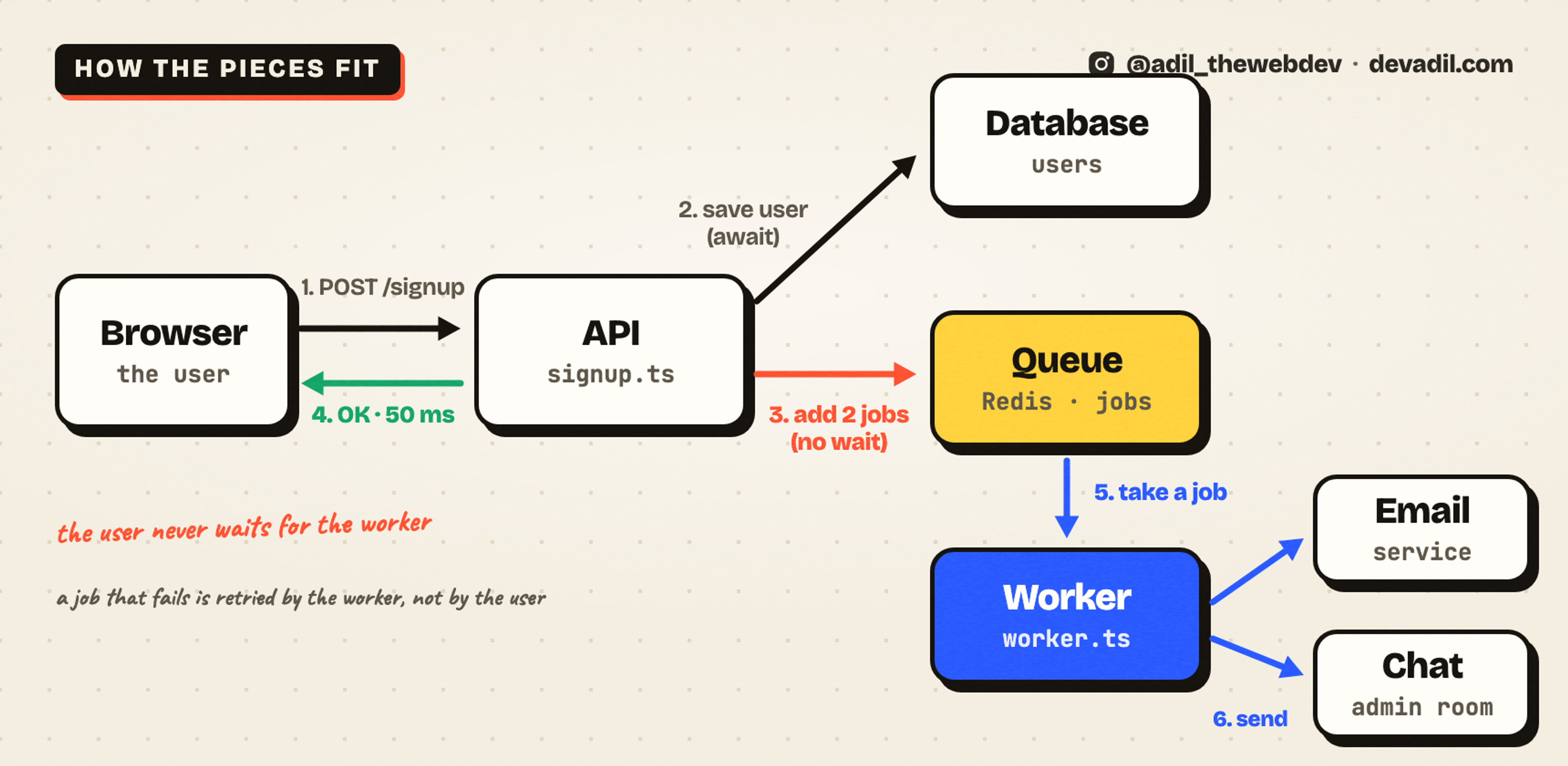
A queue is a list of jobs. The API adds a job to the list and answers the user right away. A worker is a separate process. It takes jobs from the list and does them, one by one. The user never waits for the worker.
I work on a service that creates ads on advertising platforms. One click can create 100 ads, and every ad has a video to upload. That takes minutes. No browser waits for minutes. So the API saves the batch, answers "created" in a few hundred milliseconds, and a worker does the uploads. The user watches the progress.
So a queue is not an advanced thing. It is how every big app answers fast. But a queue brings its own problems. Let's see the ones we met.
Problem 1: The user waits for work they do not need
Look at the signup code on the top again. The user needs one thing from it: an account. The welcome email can arrive a minute later. The admin message can arrive an hour later. But the code makes the user wait for all of it.
And the wait is the small problem. The big one is the failure. The email service has nothing to do with the account. But when it is down, the signup fails. The account is already saved, and the user sees an error.
The solution: ask one question before every await
Senior engineers ask: does the user need this result right now?
- Yes? Await it. Saving the account, charging the card, checking the password. The user cannot continue without the answer.
- No? Put it in a queue and answer. The welcome email, the admin message, the weekly report. The user does not care when they happen.
Here is the same signup with that question answered:
async function signup(req: Req, res: Res) {
  const user = await saveUser(req.body);
  queue.add('welcome-email', user);
  queue.add('notify-admin', user);
  res.json({ok: true});
}
Two awaits became two add calls. The user gets the answer in 50 milliseconds. And the email service can be down all day without breaking one signup.
And here is the queue. It is 47 lines of TypeScript, with no library.
export type Job = {name: string; data: unknown};
export type Handler = (data: unknown) => Promise<void>;

const sleep = (ms: number) =>
  new Promise<void>((done) => {
    setTimeout(done, ms);
  });

export function createQueue(
  handlers: Record<string, Handler>,
  retries = 3
) {
  const jobs: Job[] = [];
  let running = false;

  const work = async (): Promise<void> => {
    while (jobs.length > 0) {
      const job = jobs.shift()!;
      for (let attempt = 0; ; attempt += 1) {
        try {
          await handlers[job.name](job.data);
          break;
        } catch (error) {
          if (attempt >= retries) {
            console.error('job failed', job, error);
            break;
          }
          await sleep(200 * 2 ** attempt);
        }
      }
    }
    running = false;
  };

  return {
    add(name: string, data: unknown): void {
      jobs.push({name, data});
      if (running) return;
      running = true;
      // start after the caller has finished, so the user gets their answer first
      queueMicrotask(() => void work());
    },
    get pending() {
      return jobs.length;
    },
  };
}
Now let's understand it part by part.
1. A list of jobs and one flag
const jobs: Job[] = [];
let running = false;
The queue is an array. running says if the worker loop is busy. That is the whole state.
2. The add call returns at once
add(name: string, data: unknown): void {
  jobs.push({name, data});
  if (running) return;
  running = true;
  // start after the caller has finished, so the user gets their answer first
  queueMicrotask(() => void work());
},
add puts the job in the list and returns. It does not run the job. If the worker is sleeping, it wakes it with queueMicrotask. That means: start after the current code has finished. So the user gets the answer first, and the job starts right after.
3. The worker loop
const work = async (): Promise<void> => {
  while (jobs.length > 0) {
    const job = jobs.shift()!;
    for (let attempt = 0; ; attempt += 1) {
work takes the first job from the list. Then it opens a loop of attempts for that one job. The next part is the body of that loop.
4. A failed job is retried, and the user never sees it
try {
  await handlers[job.name](job.data);
  break;
} catch (error) {
  if (attempt >= retries) {
    console.error('job failed', job, error);
    break;
  }
  await sleep(200 * 2 ** attempt);
}
The worker finds the handler by the job's name and runs it. If it works, break ends the attempts and the next job starts. If it throws, the worker waits 200 ms, then 400, then 800, and tries again. After the last try it logs the job and moves on. The user who signed up is long gone. They never saw any of it.
5. The worker sleeps when the list is empty
running = false;When the list is empty, the while loop ends and the flag goes back to false. The next add wakes the worker again. So the worker never spins while there is nothing to do.
The handlers are plain functions. Here are the two from the signup:
const queue = createQueue({
  'welcome-email': async (data) => {
    const user = data as User;
    await mailer.send(user.email, 'Welcome!');
  },
  'notify-admin': async (data) => {
    const user = data as User;
    await chat.post(`New signup: ${user.email}`);
  },
});
The important part: the API only knows the job name and the data. It does not know how to send an email. That is the worker's problem.
Problem 2: The worker died, and the job said "processing" forever
Our first real queue was a table in the database. One row is one job. The worker takes a row, marks it "processing", does the work, and marks it "done".
Then one day a worker restarted in the middle of a long upload. The row stayed "processing". No other worker took it, because "processing" means somebody is on it. The customer saw a job that never finished. It stayed like that for 90 minutes, until a cleanup task gave up on it.
And the cleanup made a new problem. Sometimes the worker was not dead. It was only slow. The cleanup marked the job as failed while the worker was still working. So the customer saw "failed", and a minute later the ads appeared anyway.
The solution: a lock that runs out, and a heartbeat
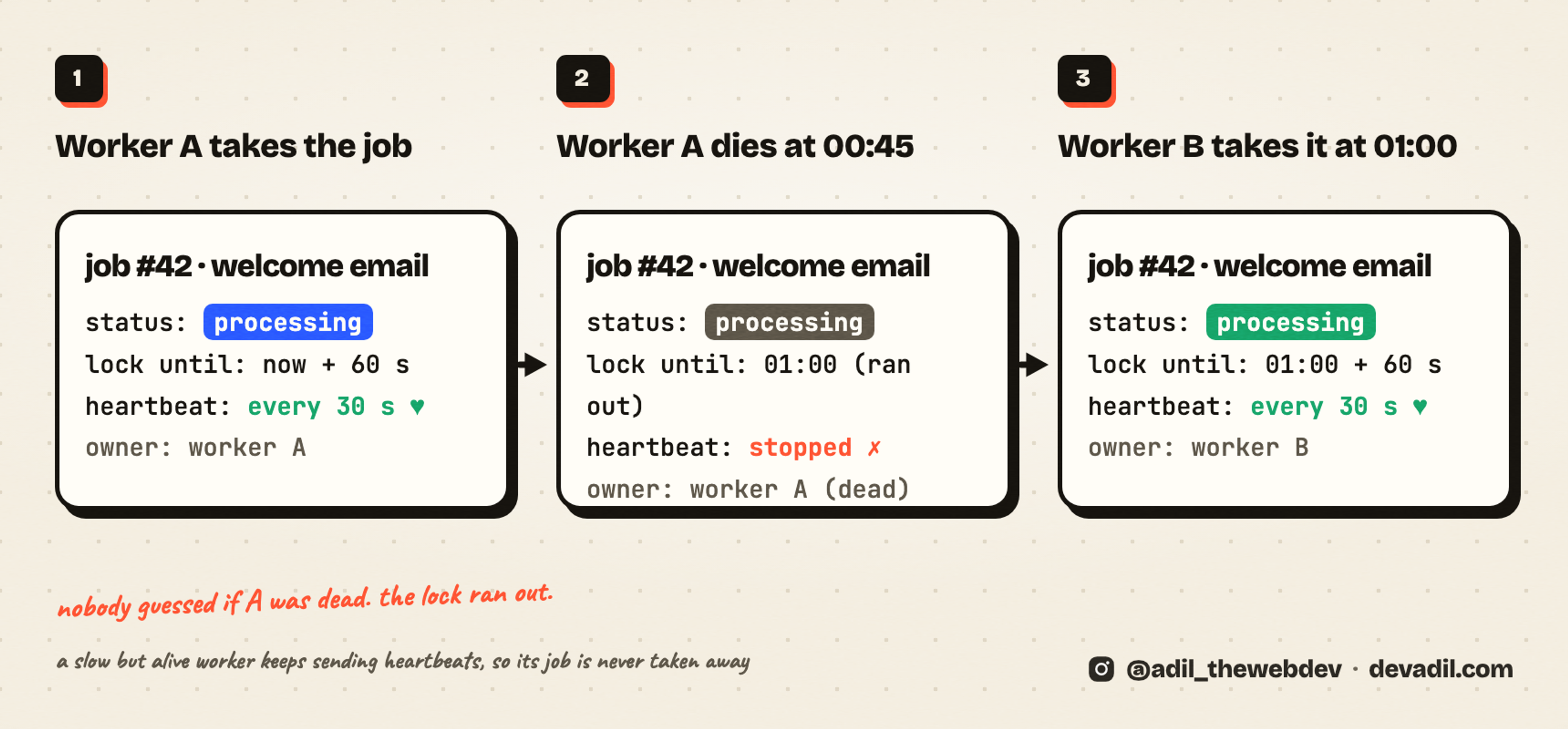
A worker does not own a job forever. It owns it for 60 seconds. While it works, it refreshes the lock every 30 seconds. This is the heartbeat.
export type Row = {
  id: number;
  status: 'queued' | 'processing' | 'done';
  lockedUntil: number;
};

const LOCK_MS = 60_000;

/** Take one job. A job whose lock ran out is free again, even if it still says "processing". */
export function claim(rows: Row[], now: number): Row | undefined {
  const row = rows.find((r) => r.status !== 'done' && r.lockedUntil <= now);
  if (!row) return undefined;
  row.status = 'processing';
  row.lockedUntil = now + LOCK_MS;
  return row;
}

/** The worker calls this every 30 seconds while it works. When it stops calling, the lock runs out. */
export function heartbeat(row: Row, now: number): void {
  row.lockedUntil = now + LOCK_MS;
}
What happens when the worker dies? The heartbeat stops. 60 seconds later the lock runs out, and the next worker takes the job. Nobody has to guess if the worker is dead. And a slow worker that is still alive keeps its lock, so nobody takes its job away.
The code above works on an array, so you can run it. With a real table, claim is one UPDATE with the same two conditions in its WHERE: not done, and the lock has run out. The database runs one update at a time on a row, so two workers can never take the same job.
BullMQ does this for you with lockDuration and stalledInterval. A job whose lock ran out is called stalled, and it goes back to the queue.
Problem 3: The same job ran twice
A customer clicked "Import" on a large video. The page showed nothing for a few seconds, so the customer clicked again. The second request made a second job. Two workers imported the same video. The customer got two copies.
It happens in other ways too. The API adds the job, the answer is lost on the way back, and the client sends the request again. The job is the same. The queue has it twice.
The solution: the client names the job
The client sends a request ID with the request, and the job ID is that request ID. If the same ID comes again with the same data, we add nothing, and we answer with the job we already have.
export class Conflict extends Error {}

export function createSubmit(store: Map<string, unknown>) {
  return function submit(requestId: string, data: unknown) {
    const seen = store.get(requestId);
    if (seen !== undefined) {
      if (JSON.stringify(seen) !== JSON.stringify(data)) {
        throw new Conflict('this request ID was already used with different data');
      }
      return {jobId: requestId, reused: true}; // the same request again: add nothing
    }
    store.set(requestId, data);
    return {jobId: requestId, reused: false};
  };
}
One more check: the same ID with different data is refused. A client that reuses an ID by mistake gets a clear error, not a silent mix of two jobs.
And the job itself should be safe to run twice, because a retry after a crash will run it again. I wrote about that in the retry post.
Problem 4: A forgotten copy of the server took the jobs
This one took us days to find.
About 1 in 10 jobs of one kind failed, and the failures were not in our logs. Production looked clean. The worker code was correct. The jobs still failed.
The reason: every copy of our API connects to the same database. Production, but also laptops, test servers and a standby server. The queue is a table in that database. So every copy of the API was a worker too. A copy on a laptop, with old code and without the production keys, took real customer jobs. It ran them, failed, and logged nothing we could see.
The solution: a process takes jobs only when you turn it on
const ON = new Set(['on', 'true', '1', 'yes']);

/** A process takes jobs only when somebody turned it on. A forgotten copy takes nothing. */
export function workersEnabled(env: Record<string, string | undefined>): boolean {
  return ON.has((env.TASK_WORKERS ?? '').trim().toLowerCase());
}
And at boot, every process asks that question once:
/** Called once at boot. The worker loop starts only where somebody set TASK_WORKERS=on. */
export function startWorkers(env: Record<string, string | undefined>, start: () => void): boolean {
  if (!workersEnabled(env)) {
    console.log('TASK_WORKERS is not on: this process takes no jobs');
    return false;
  }
  start();
  return true;
}
One variable, set only on the production server. A copy that nobody configured takes nothing. The same rule works for BullMQ: start a Worker only in the process that should work. Connecting to Redis is not the same as working.
So when you share a queue, ask: who else can take from it? The answer is often longer than you think.
Problem 5: One bad job blocked the line
Some jobs can never succeed. A welcome email to an address that does not exist fails every time. Our worker retried it 3 times, with waits of 30, 60 and 120 seconds in between. For those 3 minutes, the good jobs waited behind it.
The opposite also happened. A provider was down for an hour, and the queue kept growing. Nothing told the API to slow down, and nothing told the user that their import would run an hour later.
The solution: decide what a retry can fix, and give the queue a limit
export class PermanentError extends Error {}

export const welcomeEmail = (mailer: Mailer) => async (data: unknown) => {
  const user = data as User;
  try {
    await mailer.send(user.email, 'Welcome!');
  } catch (error) {
    // "This address does not exist" fails the same way every time. Log it, and let the job go.
    if (error instanceof PermanentError) {
      console.error('welcome email dropped', user.id, error.message);
      return;
    }
    throw error; // "Mail server busy" is worth another try
  }
};
A temporary error is thrown, so the queue retries it. A permanent one is logged and dropped. The queue moves on at once, not after 3 minutes.
And the queue gets a limit:
export class QueueBusy extends Error {}

export function bounded(queue: {add(name: string, data: unknown): void; readonly pending: number}, max: number) {
  return {
    add(name: string, data: unknown): void {
      if (queue.pending >= max) throw new QueueBusy(`${max} jobs are already waiting`);
      queue.add(name, data);
    },
  };
}
When too many jobs are waiting, add throws, and the API tells the user: try again in a minute. That is better than accepting a job that will not run for an hour.
BullMQ has both: attempts with backoff for retries, and UnrecoverableError for a job that should not be retried.
One step further: event-driven architecture
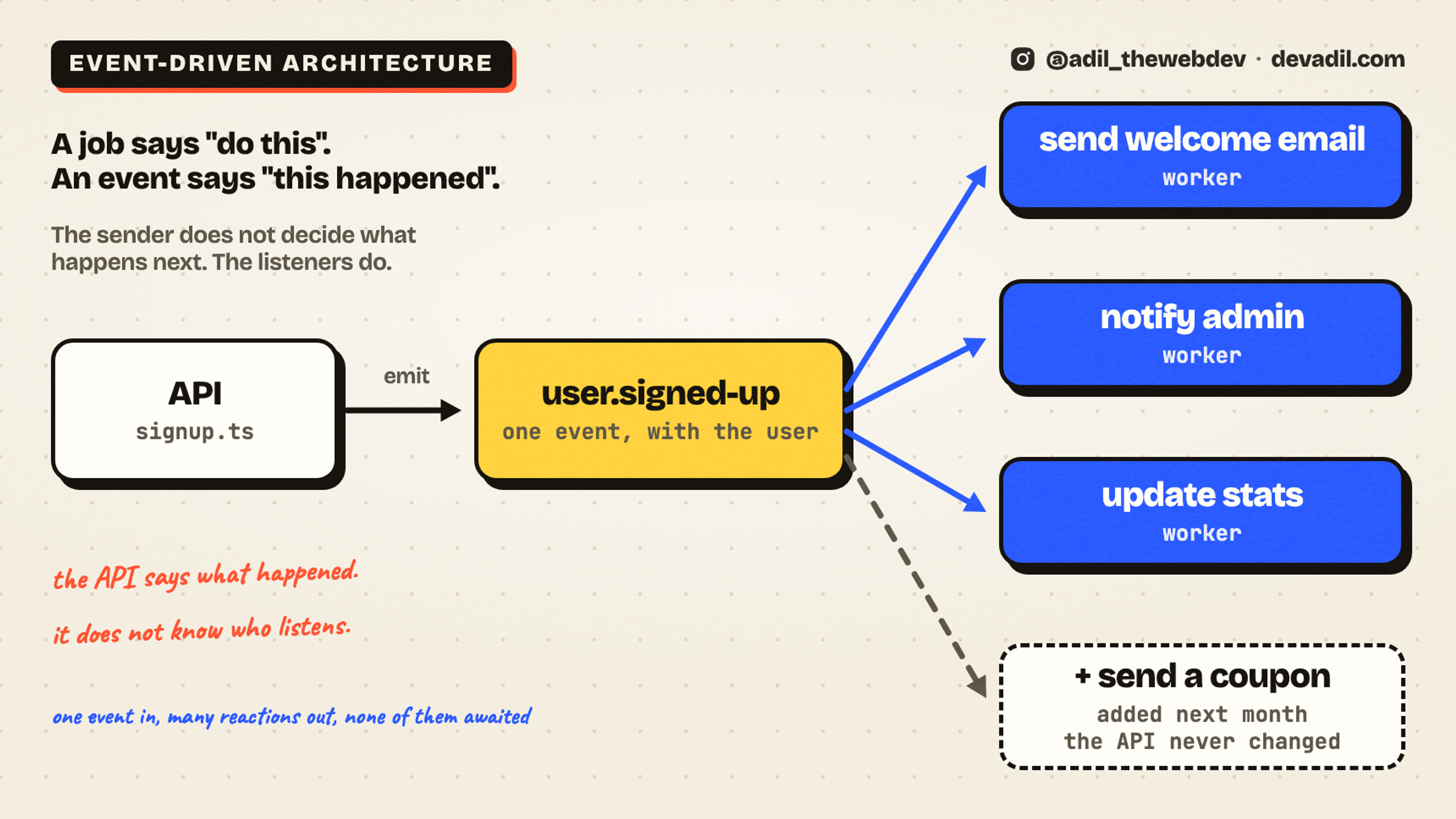
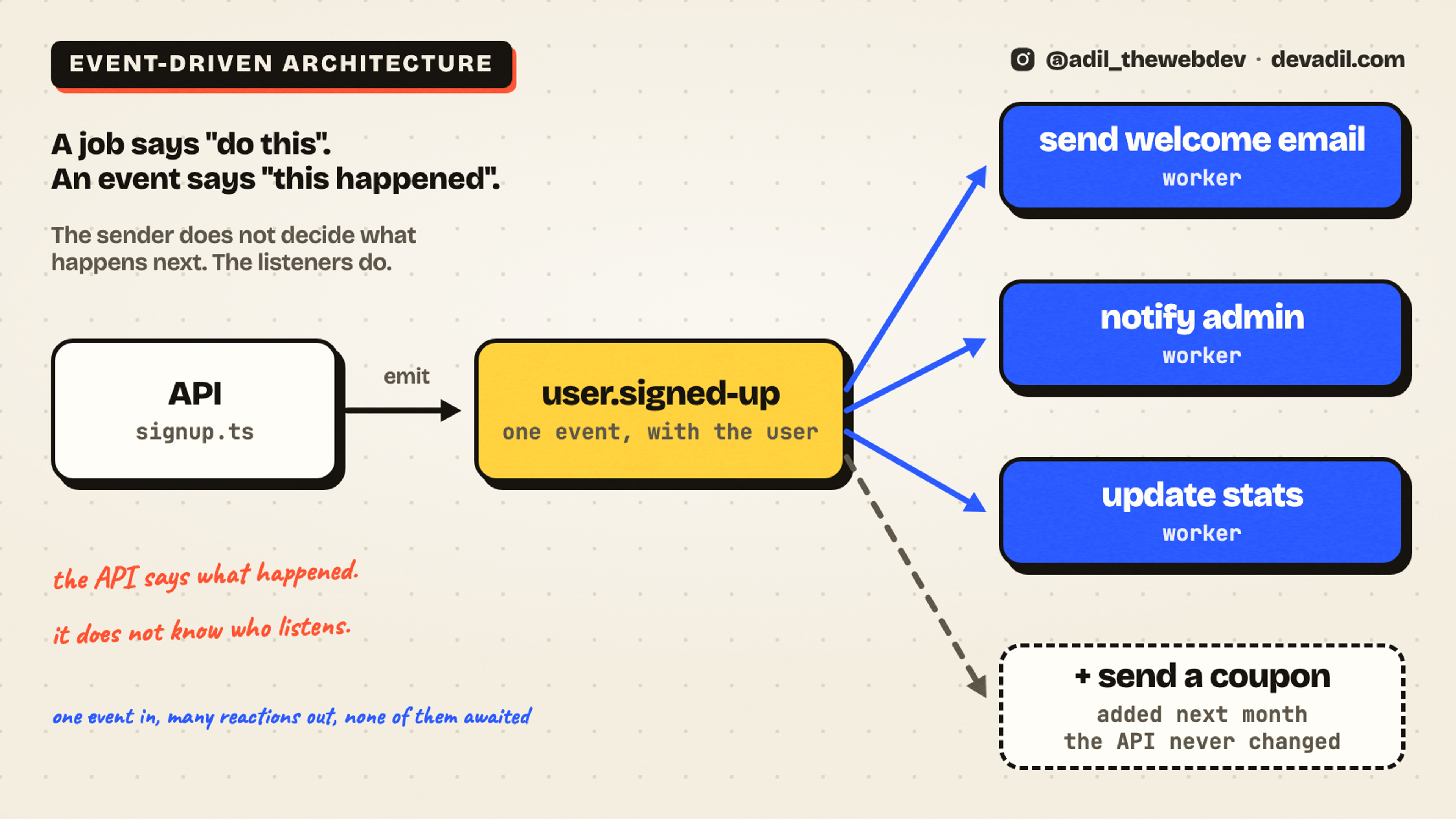
Look at the queued signup again. The API adds two jobs by name: welcome-email and notify-admin. So the API still knows what should happen after a signup. Next month you want to send a coupon too. You open the API code again and add a third line.
Senior engineers turn this around. The API does not say what to do. It says what happened: "a user signed up". That is an event. Other parts of the system listen for it, and each one decides what to do.
Here is the smallest version of it. It sits on top of the same queue.
export function createEvents(queue: {add(name: string, data: unknown): void}) {
  const listeners = new Map<string, string[]>(); // event name → job names

  return {
    /** "When this event happens, run this job." The API never sees this list. */
    on(event: string, job: string): void {
      listeners.set(event, [...(listeners.get(event) ?? []), job]);
    },
    /** One event in, one job per listener out. */
    emit(event: string, data: unknown): void {
      for (const job of listeners.get(event) ?? []) queue.add(job, data);
    },
  };
}
The listeners are registered in one place, away from the API:
export function registerListeners(events: {on(event: string, job: string): void}) {
  events.on('user.signed-up', 'welcome-email');
  events.on('user.signed-up', 'notify-admin');
  events.on('user.signed-up', 'update-stats');
}
And the signup becomes one line shorter, and it never changes again:
async function signup(req: Req, res: Res) {
  const user = await saveUser(req.body);
  events.emit('user.signed-up', user);
  res.json({ok: true});
}
So what is the difference between a queue and an event? A job says "do this". An event says "this happened". With a job, the sender decides what happens next. With an event, the listeners decide. That is the whole idea of event-driven architecture. One part announces, many parts react, and none of them wait for each other. Big systems are built on it.
One honest note. An event name is a promise. Name it after what happened (user.signed-up), never after what to do (send-email). And once other parts listen to it, changing its data breaks them. Treat it like an API.
Which queue should you use?
The queue in this post lives in memory. That is fine for learning. It is not fine for production, because a restart loses every job. Real systems keep the queue somewhere that survives a restart.
- BullMQ with Redis if you are in Node. It has retries, backoff, locks, delayed jobs and a dashboard. Start here.
- A table in your database if you already have Postgres and a few jobs a minute. Our first queue was a table, and it worked for years. Claim a row with one update that also checks the status, so two workers cannot take the same row.
- RabbitMQ when many services talk to each other.
- Kafka for very high volume, when you also need the history of every event.
- SQS or Cloud Tasks if you are on AWS or Google Cloud and do not want to run anything yourself.
Whatever you pick, the signup code stays the same: save the user, add two jobs, answer.
What this does not solve
I want to be honest with you. A queue moves the work. It does not make the work free.
- The user does not know if the job failed. The signup worked, the email did not. Keep a status for every job, and show it, or send a message when a job fails for good.
- Order is not promised. Two jobs for the same user can run on two workers at the same time. If the order matters, put both steps in one job.
- Debugging is harder. The request is over when the job runs, so the error is not in the request's logs. Put the job ID and the user ID in every log line of the worker.
- It is one more thing to run. A worker process, and Redis or a table to watch. For a small app, a queue inside the same process is a fine first step.
All the problems and solutions
- The user waits for work they do not need. Ask: does the user need this right now? If not, add it to a queue and answer.
- The worker died and the job stayed "processing". A lock that runs out, refreshed by a heartbeat.
- The same job ran twice. The client names the job with a request ID, and the same ID adds nothing.
- A forgotten copy of the server took the jobs. A process takes jobs only when you turn it on.
- One bad job blocked the line. Retry temporary errors, drop permanent ones, and give the queue a limit.
And one step further: let the API say what happened, not what to do. That is event-driven architecture, and it is how you add the next reaction without touching the API.
Links to read next
- BullMQ: workers, retrying failing jobs and stalled jobs. The library version of problems 2 and 5.
- Stripe: idempotent requests. How a real API uses request IDs, like problem 3.
- AWS: what is event-driven architecture?. The long version of the event section.
- RabbitMQ tutorials and Kafka: introduction. When one queue is not enough.
- Amazon SQS and Google Cloud Tasks. Queues you do not have to run yourself.
- MDN: queueMicrotask. The one line that makes the in-memory queue answer first.
- My earlier posts: how to stop one user from crashing your API and how to retry failed requests.
What is next
Now the user waits for nothing. But the worker still calls the email service. And when that service is down for an hour, the worker fails, waits, and fails again, for every job. The next post is the circuit breaker: when to stop calling a service, and when to try it again.
I post every topic as a short video first. You can follow @adil_thewebdev on Instagram for the next one. And if you are building something that has to scale, you can contact me here.